


Turn Zoom calls to a month of repurposed content instead of rebuilding your content calendar from scratch. Record an approved conversation, prepare a clean transcript, and turn its strongest ideas into reviewed posts. This 2026 workflow builds a four-week publishing plan from material you already created, without making every post sound like meeting minutes.
- Turn Zoom calls into content with a reviewed transcript, distinct ideas, and a four-week publishing calendar.
- Our AI marketing coaching suits coaches, creators, and entrepreneurs who want authentic content strategy.
- Plan 12 posts only when the recording supports 12 useful angles; never pad the calendar.
- Keep recording permission, factual checks, and human approval between the conversation and publication.
Why this matters
A useful coaching call contains more than answers. It contains the exact questions your audience asks, the objections that stop action, and the examples that make your advice understandable. Starting with those conversations gives you source material instead of another blank document.
Our AI marketing coaching suits coaches, creators, and entrepreneurs who want authentic content strategy. The approach here reflects that priority: use tools to organize your thinking, not replace your personality. Explore Molly Mahoney for the brand’s coaching and training services.
The trade-off is real. Repurposing saves you from inventing every topic, but it still requires permission, editing, and judgment. An accurate transcript can contain something you should never publish.
Your goal for 2026 is a repeatable editorial workflow not an unattended pipeline from a private conversation to a public feed.
Before you start
- Recording access and permission: Choose a Zoom meeting you can record. Tell participants how you intend to use the conversation, obtain appropriate permission, and follow applicable recording requirements. Permission to attend a call is not permission to appear in marketing content.
- A usable source and a drafting workspace: Have the recording, a transcript or transcription method, somewhere to edit drafts, and your intended publishing destinations. If you lack a transcript, resolve that before asking a drafting tool to extract ideas.
- The gotcha: transcript access is not guaranteed: Recording and transcription capabilities depend on your account, meeting settings, and administrator controls. Confirm your recording route before the real conversation; do not discover afterward that you captured no usable source.
Choose material you control. A teaching session or an approved interview is easier to repurpose than a client conversation full of sensitive details. For client material, exclude identifying information unless you have explicit permission to publish it.
Source capture and transcript preparation
Record the conversation you can actually use
- Open the Zoom meeting and confirm that recording is permitted for your role and account. If a host or administrator controls recording, arrange access before the session begins.
- Explain the intended content use before recording. Give participants a clear way to decline public use of their contributions.
- Select Record when the meeting controls make recording available. Follow the recording destination offered by your setup rather than assuming every account has the same choices.
- Teach or discuss one clear problem. Ask follow-up questions that expose the reasoning behind an answer: what happens first, what usually gets misunderstood, and what the listener should do next.
- End the recording and confirm that the resulting file or account-based recording is accessible. Open it and check that the spoken conversation is audible before moving on.
Expected result: You have an accessible recording with clear permission boundaries. You know which sections are usable and which must stay private.
Do not treat the recording notice as your whole permission process. Zoom’s recording controls manage capture; your publication decisions still need their own review.
Prepare a source document, not just a text dump
- Obtain the transcript through your available transcription route. Keep the original recording so you can verify wording and context.
- Create a working copy and remove names, personal circumstances, account details, and other information that does not belong in public content.
- Check important passages against the recording. Correct names, specialist terms, missing negatives, and incorrectly assigned speakers.
- Add these working-document headings: Source details, Approved material, Audience questions, Useful examples, and Do not publish. These are your editorial labels, not Zoom settings.
- Save the document with a clear identifier, such as
2026-call-topic-reviewed. Keep the unedited transcript separate from the approved copy.
Expected result: Your drafting tool receives an edited source document with usable ideas and explicit exclusions not an unfiltered client conversation.
Your weird wording belongs here, too. If an unusual phrase explains your idea better than generic business language, preserve it. Clean up transcription errors without sanding away your voice.
Idea extraction and draft configuration
Build the idea bank before writing posts
Start with meaning, not output volume. A conversation about one narrow problem does not automatically contain a month of distinct advice.
- Read the approved transcript and mark passages that answer a specific audience question. Give each passage a short topic label.
- For each passage, record the problem, your answer, the supporting example, and the relevant source location. Use a timestamp when one exists; otherwise preserve the passage itself.
- Separate different ideas from different phrasings. A checklist and a short post can share a source, but they should help the reader in different ways.
- Remove ideas that require missing context, unapproved client stories, or unsupported results. Keep fewer topics rather than inventing supporting evidence.
Use this prompt in your drafting workspace:
Using only the approved transcript below, identify distinct content ideas for my audience. For each idea, provide the audience question, the central answer, the supporting source passage, and any missing context. Do not invent results, quotations, examples, or claims. Exclude everything marked Do not publish. Return fewer ideas when the source does not support more.
Expected result: You have a traceable idea bank. Every proposed topic points back to something the conversation actually supports.
For Molly Mahoney’s audience of coaches, creators, and entrepreneurs, the useful question is not “Can this become a post?” It is “Will this help someone understand a problem or take a sensible next step?”
Give each draft a separate job
- Choose the reader and the action before drafting. A post for someone discovering a problem should not assume the same knowledge as an email to an existing subscriber.
- Assign a format to each idea: explanation, objection response, checklist, example, or reflection. Treat formats as editorial choices, not promises that every source fits every format.
- Supply approved voice examples alongside the source passage. Ask the drafting tool to preserve your vocabulary and sentence rhythm without copying unrelated claims.
- Generate a working draft, then compare it with the source. Mark anything that adds facts or certainty the conversation never supplied.
A useful drafting instruction is:
Turn this approved passage into a standalone post for the audience described below. Open with the problem and answer it directly. Preserve my distinctive language where it helps understanding. Use only supported facts. End with the next action provided in the brief, and flag anything that needs verification outside the publishable draft.
Expected result: Each draft has a defined reader, a distinct purpose, and a source you can check.
Do not confuse voice with a catchphrase. Repeating the same punchy opening across every draft creates sameness, not personality. Keep the thought process; vary the delivery.
Approval and calendar configuration
Build the four-week plan
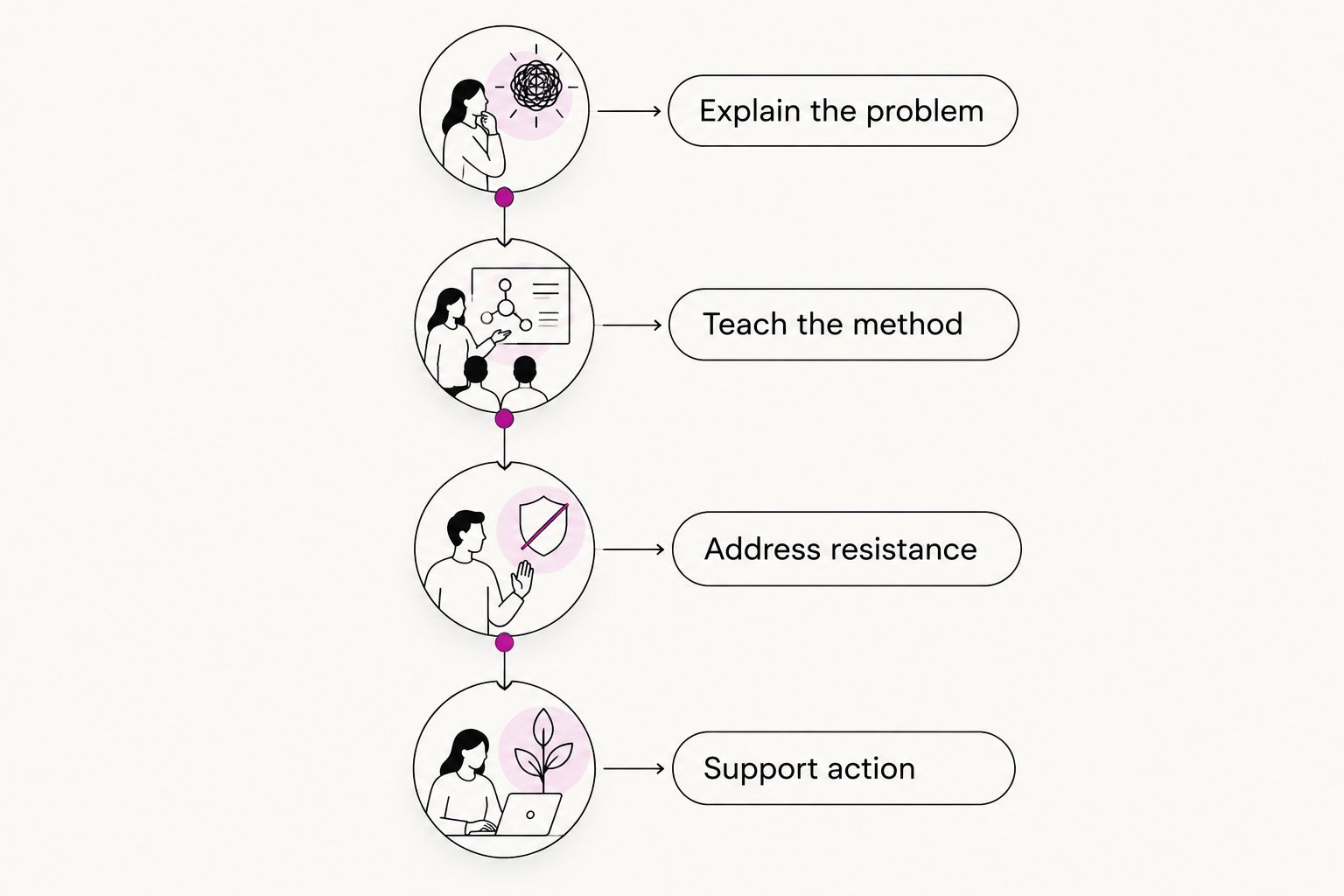
Use this as a planning template for 2026: 12 posts across four weeks, at three posts per week. Those numbers describe the proposed schedule, not a guaranteed yield from one call or a proven performance benchmark.
- Group approved ideas into themes. Put foundational explanations before posts that assume the reader already understands the basics.
- Give each calendar entry a source passage, draft owner, publishing destination, intended reader, and next action.
- Assign dates only after checking that adjacent posts add something different. Separate repeated examples and closely related arguments.
- Reduce the schedule when the source runs thin. Eight useful posts beat a padded plan with invented stories or recycled conclusions.
| Week | Editorial job | Suggested posts | Reader takeaway |
|---|---|---|---|
| Week 1 | Explain the problem | Question, misconception, first step | Understand what needs attention |
| Week 2 | Teach the method | Process, checklist, example | Know how to begin |
| Week 3 | Address resistance | Objection, boundary, clarification | Understand when the advice applies |
| Week 4 | Support action | Reflection, recap, next step | Choose a practical action |
Expected result: Your calendar has a clear sequence rather than a pile of disconnected excerpts. Every planned post earns its place.
Keep approval separate from scheduling
- Check each draft against its source for factual accuracy and speaker attribution. Remove any invented quote, outcome, or personal detail.
- Read the draft aloud. Rewrite sentences you would never say and add missing context that a reader outside the call needs.
- Review permission and privacy again. A detail can become identifying when combined with the rest of the post.
- Move approved drafts into your publishing system. Preview formatting and links before scheduling, then confirm the intended destination and date.
Expected result: Only approved content reaches the publishing queue. Draft generation remains separate from permission to publish.
For your 2026 tracker, use three working statuses: Draft, Needs review, and Approved. These are labels you create, not universal software buttons. Keep scheduling downstream of Approved.
Second variant: refresh content after a follow-up call
A follow-up conversation can improve existing content instead of launching another calendar. Use this variant when participants revisit the same topic with better questions, corrections, or clearer examples.
| Workflow | Best for | Advantage | Limitation |
|---|---|---|---|
| New-content batch | A call with several distinct teaching points | Creates a connected publishing sequence | Needs enough source material to avoid repetition |
| Existing-content refresh | A follow-up that clarifies the same topic | Improves explanations already drafted | Requires checking what changed before editing |
- Prepare the new transcript using the same permission and privacy checks.
- Compare its approved passages with the earlier idea bank. Identify corrections, new examples, and genuinely different answers.
- Update affected drafts before scheduling. For published material, correct inaccurate statements rather than silently recycling them into new posts.
- Preserve the source history so you can explain why an answer changed.
Expected result: The newer call strengthens the content rather than producing another batch of near-duplicates.
The refresh workflow is narrower. It will not always fill another month, and that is fine. Its job is accuracy and clarity.
Troubleshooting
The recording exists, but the transcript does not
Check whether your recording setup includes transcription and whether it was enabled. If not, use an authorized transcription method with the recording you captured. Never send confidential material to a service without checking your obligations and its data-handling terms.
The transcript changes the meaning
Listen to the source passage and correct the working copy before drafting. Pay special attention to negation, speaker changes, and technical terms; a missing “not” can reverse your advice.
Every draft sounds like the same post
Return to the idea bank and assign different reader questions. Changing the opening sentence does not create a new angle. Combine duplicates and shorten the calendar.
The drafts sound polished but unlike you
Provide approved examples of your own writing and preserve distinctive source phrasing. Read the results aloud. If you cannot imagine saying the sentence to a real person, rewrite it.
A post reveals more than intended
Remove the draft from the queue and review the full context, not just the name. Rework it around your general teaching point or leave it unpublished when anonymization does not resolve the issue.
Customize your workflow
Expand one part of the workflow at a time. Start with reliable source preparation; then improve drafting instructions, approvals, and calendar organization. Connecting more tools does not fix a source document that contains private information or unclear advice.
Molly Mahoney offers AI marketing coaching and training for this broader skill set. The advantage is guidance focused on marketing and authentic content; it is not a substitute for reviewing your own source material or obtaining publication permission.
Before adding automation in 2026, identify the exact handoff you want to reduce. Moving an approved draft into a queue is different from giving a tool authority to publish. Automate the handoff only after the approval boundary is clear.
FAQ
How do I turn Zoom calls into content without losing my voice?
Start with an approved transcript and preserve the phrases that sound like you. Give your drafting tool examples of your writing, then read each draft aloud before approving it.
Can one Zoom call really become a month of content?
One Zoom call can support a month of content when it contains enough distinct, useful ideas. The proposed schedule is 12 posts across four weeks, but you should reduce it when the source cannot support that volume.
Do I need a Zoom transcript before I start?
You need an accurate text source before using a text-based drafting workflow. Confirm your available transcription route before the call, then verify important passages against the recording.
Can I repurpose a private coaching call?
Repurpose a private coaching call only with appropriate permission and a review of confidentiality obligations. Remove identifying details and exclude material participants have not approved for public use.
Should I automate publishing straight from the transcript?
Keep human approval between the transcript and publication. A generated draft can misattribute a statement, expose private information, or add claims the source does not support.
What should I do when the call only gives me a few useful ideas?
Publish fewer pieces or combine the call with other approved source material. Do not stretch one answer into a month of repetitive posts or invent examples to fill calendar gaps.
Who is Molly Mahoney’s AI marketing coaching for?
Molly Mahoney’s AI marketing coaching serves coaches, creators, and entrepreneurs seeking authentic content strategy. The site also offers training programs and keynote speaking services.
One last thing
The most useful part of a call is sometimes the question, not your longest answer. A confused follow-up shows you where the explanation broke down. Build your next post around that gap—and answer it more clearly than you did live.
Keep that as your 2026 quality check: would this piece make sense to someone who never attended the call? If not, it needs context, not another scheduling slot.


Leave a Reply