

GPT stacking is the process of using multiple Ai agents, each with its own role or expertise, to collaborate inside a single workflow. Rather than having one generic assistant do everything, you assign specific jobs to each GPT, like “creative copywriter,” “marketing strategist,” or “SEO expert.”
Each Ai agent brings unique features to the workflow, such as advanced reasoning, multi-step task execution, and integration with external tools, enhancing the overall capabilities of the system.
It’s like having a dream team in one chat. And when they “talk” to each other using structured prompts, the output is smarter, faster, and surprisingly aligned.
This guide is for coaches, service providers, personal brands, and solopreneurs who want to use Ai for strategic thinking, not just task automation.
If you’ve ever wished you had a team to bounce ideas off, but you’re running solo (or your team is stretched thin), this blog shows you how to use GPT stacking to brainstorm, strategize, and create just like a group of experts working in sync.
Key Takeaways
- Understand what GPT stacking is and how it boosts creativity
- Learn how to assign roles to different GPTs for focused outputs
- Use prompt chaining to make GPTs talk, challenge, and refine each other’s work
- See real examples of GPT stacks creating strategies, content, and branding
- Get prompts and frameworks that bring your Ai “brain trust” to life
- Discover how GPT stacking leverages several features of Ai agents, such as scalability and autonomy, to enhance collaboration and output quality
- Understand the difference between GPT stacking and using a single Ai assistant, especially in terms of capabilities and collaborative results
Table of Contents
Understanding AI Models
Ai models like ChatGPT are at the heart of today’s generative Ai revolution. These large language models are designed to generate human-like text by learning from massive amounts of training data, think books, articles, websites, and conversations. The process starts with training, where the model analyzes patterns in human language, picking up on grammar, context, and even subtle nuances. Models can also be adapted to new tasks using transfer learning, which allows them to leverage knowledge from previous training to perform well on different or specialized tasks.
When you interact with ChatGPT or similar Ai services, you’re tapping into a system that can process your input, understand the context, and generate text that feels surprisingly human. Whether you’re writing emails, brainstorming ideas, or translating languages, these models make it possible to automate and enhance a wide range of tasks, all by leveraging the power of artificial intelligence and the richness of human language.
Why GPT Stacking Feels Like a Team of Experts
Before I discovered GPT stacking, I used Ai for simple tasks, like repurposing content or writing a caption. But once I gave each GPT its own “job,” things changed. It was like running a virtual team meeting where everyone had input and a specialty. The interactions between the different GPTs closely simulate real team dynamics, with each agent contributing unique insights and responses through their interactions.
One GPT would suggest a launch strategy. Another would ask clarifying questions. A third would push back with alternatives. And suddenly I wasn’t just “using Ai,” I was collaborating with it.
GPT stacking allows you to simulate multiple perspectives. You can have your own marketing team, creative director, copywriter, and customer avatar, all in one window. The interaction between you and the Ai team becomes more dynamic, as you guide the conversation and receive feedback from multiple roles. This not only saves time… it unlocks better ideas, faster decisions, and wildly more creative solutions.
GPT stacking can help tackle challenging projects that would otherwise require a team of humans.
Of course, while Ai can simulate collaboration, it’s important to remember the unique qualities, creativity, and emotional depth that humans bring to creative teamwork.
Step-by-Step Guide: How I Set Up My GPT Team to Collaborate
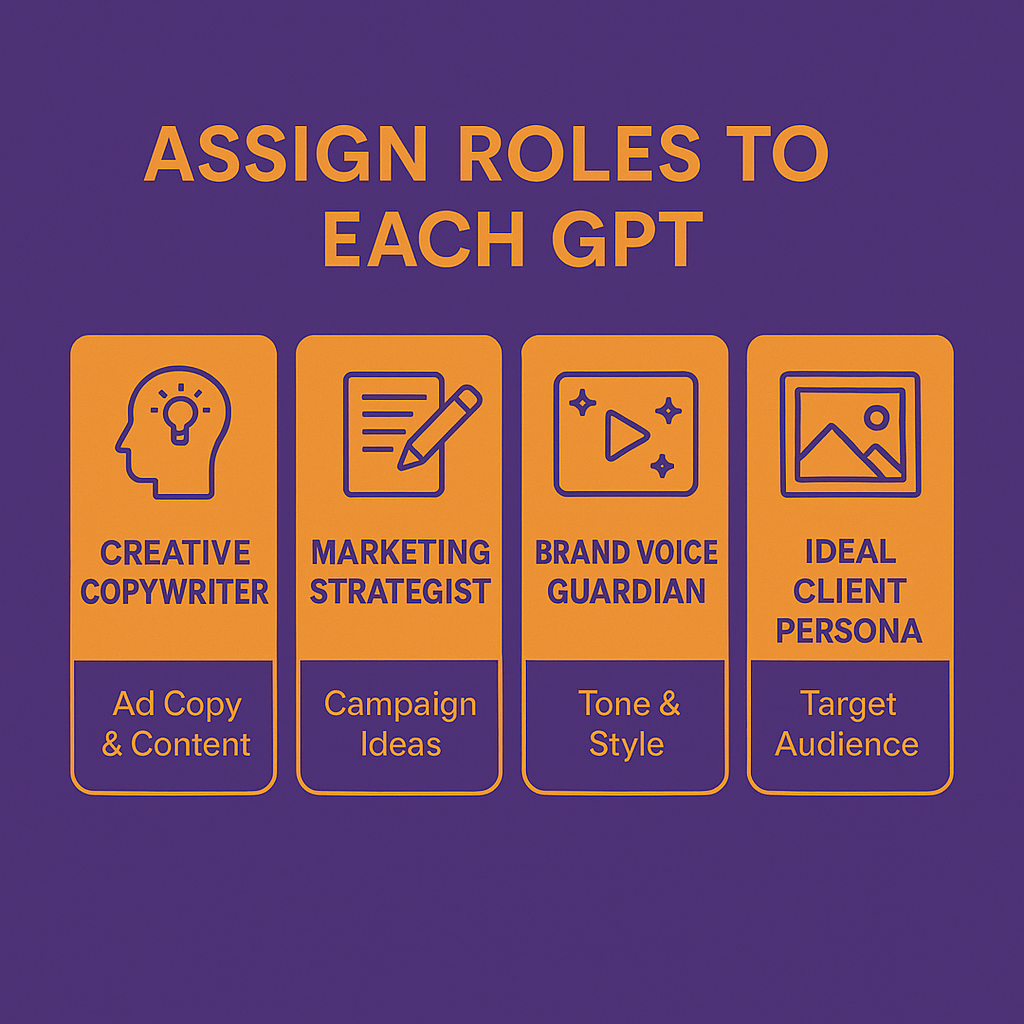
Step 1: Assign Roles to Each GPT
I start by defining who’s in the room. For example:
- GPT 1: Creative Copywriter
- GPT 2: Marketing Strategist
- GPT 3: Brand Voice Guardian
- GPT 4: Ideal Client Persona
Each GPT can be assigned to act in a specific role, such as answering questions, writing content, or generating ideas for certain types of tasks. Each GPT gets a role-specific prompt and uploaded context (like a brand voice doc or recent offer).
Step 2: Set the Stage in One Thread
I initiate the session by prompting each GPT with its role and inviting collaboration. The interface (such as the ChatGPT interface) allows you to manage and direct your Ai team efficiently:
“You are my Marketing Strategist. You’ll help me shape this launch plan based on my client avatar’s needs. Please respond after reading the Brand Voice GPT’s tone recommendations.”


Step 3: Start the Conversation
I prompt each one sequentially. One GPT offers a strategy, another reacts, another refines. The GPTs can write, generate, and refine written content collaboratively, ensuring that the generated outputs align with your goals. You can even ask:
“Copywriter GPT, what do you think of the strategist’s approach? Would you position this differently?”
Step 4: Let Them Iterate Together
Over time, this feels like a real conversation. The process may involve several iterations to improve the quality of the generated outputs. The results are layered, cohesive, and surprisingly intuitive.
Note: GPTs may sometimes produce nonsensical answers or make mistakes, so reviewing outputs is important. GPT stacking is especially useful for certain types of tasks that require multiple perspectives or expertise.

Examples of GPT Collaboration: Strategy, Copy, and Creative Ideas
Here are a few ways I’ve used GPT stacking to simulate expert-level collaboration:
→ Launch Planning: The strategist GPT outlines a 3-part campaign. The client avatar GPT critiques it based on “real-world” objections. The voice GPT tweaks the tone to feel more playful. The final campaign plan is generated by the collaborative efforts of the GPTs.
→ Offer Creation: The researcher GPT scans competitor offers, sometimes accessing the web to gather up-to-date data. The copy GPT drafts angles, with the copy written by the Ai team. The brand GPT flags anything off-message.
→ Email Writing: The Ai team builds a sequence: the strategist sets the structure, the writer drafts each email, and the persona GPT makes sure it hits emotionally. Each GPT interacts with the others to ensure the sequence is cohesive and the generated emails align with the intended strategy.
This “brainstorming circle” lets me move from scattered ideas to a polished strategy in under an hour.
Prompts That Make GPTs Talk to Each Other (and Why It Works)
Here are prompts I use to keep the conversation flowing between agents:
- “Brand Voice GPT, please review this message and suggest changes based on our tone guide.”
- “Avatar GPT, based on your persona’s needs, what objections might they have to this offer?”
- “Strategist GPT, how can we reposition this angle to be more urgency-driven?”
- “Copy GPT, rewrite this headline with more emotional impact, but keep the benefits outlined by the strategist.”
One of the core functions of GPT stacking is answering questions from different perspectives, allowing each agent to contribute unique insights. The ChatGPT interface makes it easy to enter prompts and manage the conversation between agents. Each prompt generates a unique response based on the agent’s role.
However, sometimes the Ai may produce nonsensical answers, so it’s important to review outputs carefully.
Collaboration with Ai Agents
Collaboration with Ai agents is transforming the way we approach problem-solving, creativity, and decision making in both business and creative fields. Ai agents powered by large language models, like ChatGPT, are designed to process vast amounts of training data and generate human-like text that feels natural in conversation. By leveraging these models, users can automate routine tasks, analyze complex data, and receive informed decisions in real time.
A key advantage of working with Ai agents is their ability to learn and adapt through human feedback and reward models. This fine-tuning process ensures that the agents not only understand the nuances of human language but also deliver high-quality, context-aware responses tailored to specific needs.
However, effective collaboration with Ai agents requires an understanding of both their capabilities and their limitations. That’s why it’s important to set clear guidelines, provide relevant context, and continuously review the quality of outputs. By doing so, humans and Ai agents can work together seamlessly, combining the efficiency of artificial intelligence with the creativity and judgment of human collaborators.
Decision Making with GPT Stacking
One of the standout benefits of GPT stacking is its ability to support smarter, more informed decision-making. By layering multiple models, you can generate responses that are not only more accurate but also more nuanced, helping users tackle complex questions with confidence.
GPT stacking also helps catch mistakes or biases that a single model might miss. By having multiple agents review and refine each other’s work, you reduce the risk of incorrect or misleading information slipping through.
Common Pitfalls and How to Keep Your Ai Brainstorming Clean
Don’t give each GPT too much to do. Keep their roles simple and clear. Each GPT’s capabilities may be limited by the data or context provided, so be mindful of these constraints.
Avoid circular prompts where one GPT depends on another to “finish” before it can begin. Use structure and step-by-step logic.
Don’t skip your uploads. If your GPTs don’t have access to your brand voice, customer info, or context… they’re just guessing.
And finally… review everything. It’s easy to make a mistake if you don’t double-check the outputs. GPTs can sometimes generate nonsensical answers, so always review for logic and accuracy. Just like with a human team, the magic comes from refining what the group builds.
Frequently Asked Questions
What is GPT stacking?
GPT stacking is assigning different Ai agents to specific roles and letting them collaborate inside one conversation for better, faster results.
What is the difference between GPT stacking and using a single Ai assistant?
The main difference is that GPT stacking involves multiple Ai agents, each with specialized purposes and interactions, while a single Ai assistant handles all tasks alone. This allows for more complex workflows and improved results.
Do GPTs really “talk” to each other?
Yes. When you use structured prompts, they can reference, respond to, and refine each other’s outputs in real-time.
Can I use GPT stacking without code?
Absolutely. Platforms like ChatGPT let you do this inside custom GPTs or standard threads.
Is GPT stacking or ChatGPT free to use?
Some features of ChatGPT, especially during its research preview and early releases, were available for free. However, advanced features or continued access may require a paid subscription.
Does OpenAI take a fee from transactions or services?
Yes, OpenAI takes a cut or fee from certain transactions, such as payments for premium features or services within ChatGPT and related platforms.
Can GPT stacking use web-connected agents to access up-to-date information?
Yes, GPT stacking can include web-connected agents that access the web to retrieve current information, enhancing the accuracy and relevance of generated outputs.
Does this replace real human collaboration?
No, but it supports it. GPT stacking is perfect for ideation, drafts, and problem-solving before bringing it to your team.
What kinds of tasks can GPTs collaborate on?
Launch planning, copywriting, email sequences, content repurposing, market research, funnel audits, and more.
Recommended Tools + Resources
I use ChatGPT to build and stack my GPTs. The user-friendly ChatGPT interface makes it easy to manage multiple agents and streamline interactions.
Future of GPT Stacking
The future of GPT stacking is bright, with exciting developments on the horizon for businesses, creators, and anyone looking to harness the power of artificial intelligence. As Ai models become more advanced, we can expect GPT stacking architectures to handle even more complex tasks with greater accuracy and efficiency.
GPT stacking is more than a productivity hack , it’s how I brainstorm, strategize, and create like I’ve got a full team, even when I’m working solo.
Each GPT plays its role, contributes unique value, and challenges the others, just like a mastermind session in your pocket.
When you give them structure, direction, and voice… they don’t just support your work, they amplify it.
Want to see how to build your own GPT team?
Join my next live Ai workshop. I’ll walk you through how to turn your solo session into a full-on Ai-powered brainstorm with outputs you can actually use, sell, and scale.


Leave a Reply